
Scenarios
Expand one product brief into a complete asset pipeline
Generate coherent concept designs, orthographic views, campaign imagery, style boards, and launch copy while keeping every result linked to its source brief.
When to use this scenario
Use this for early product exploration, campaign concepting, internal design reviews, or any process that needs several related assets from one structured brief.
What you provide
- A short Concept name.
- A concrete Concept description covering geometry, materials, colors, controls, intended setting, and constraints.
- Optional audience, owner, campaign, or approval fields added for your team.
What Kition produces
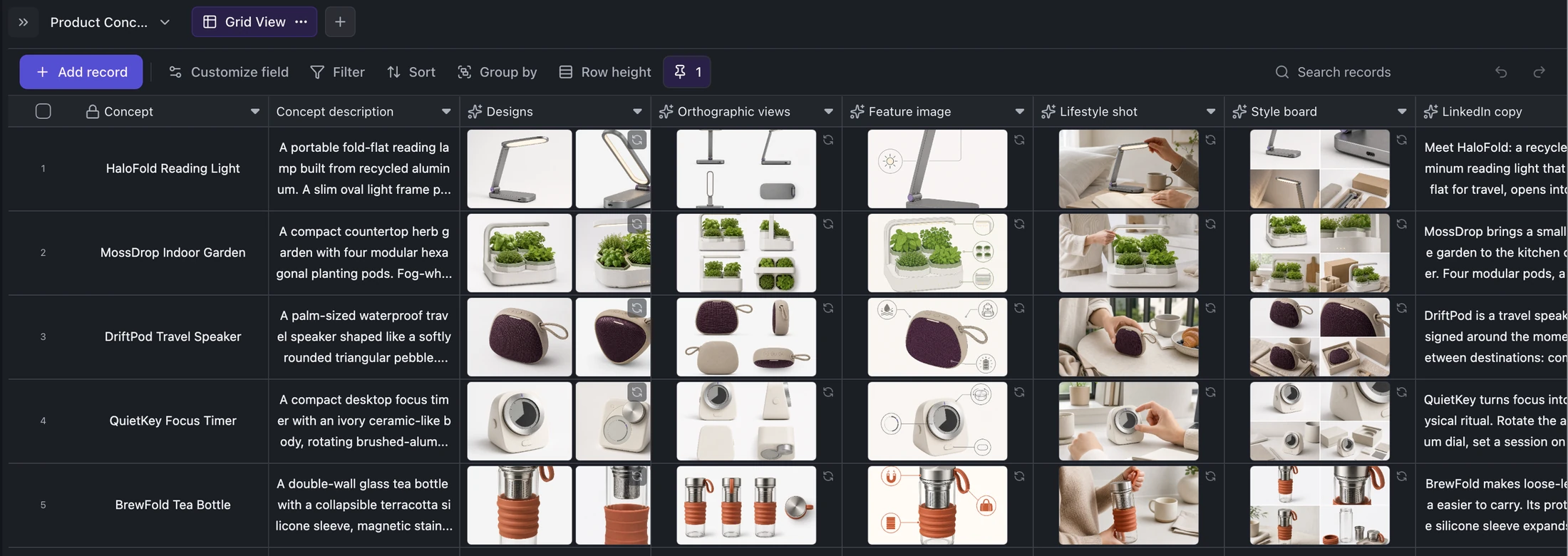
- Two initial 4:3 design candidates.
- An orthographic presentation based on the chosen design references.
- A feature image, lifestyle shot, and four-panel style board.
- LinkedIn copy below 400 characters and short launch copy below 280 characters.
How the workflow runs
Create one row per product concept and write a precise visual brief.
The Designs field generates two initial references from the concept description.
Downstream image fields use those references to preserve geometry, colors, and materials across orthographic, feature, lifestyle, and style-board assets.
Text fields turn the same brief into channel-specific launch copy; review or regenerate individual fields without losing the rest of the record.
What to review
- Check product geometry, materials, colors, and controls for consistency across every asset.
- Reject generated logos, labels, dimensions, or unsupported product claims.
- Confirm lifestyle imagery shows a believable use case and social copy stays within the intended channel limits.
Ways to adapt it
Add target audience, target price, status, owner, and selected-design fields.
Extend the row with packaging, marketplace, presentation, or additional social formats.
Use a workflow to notify reviewers or move approved assets into a launch queue.