Warm vs Cool Photo Filter
One riverside skyline shown twice, through a warming 85 filter on the left and a cooling 80 filter on the right.
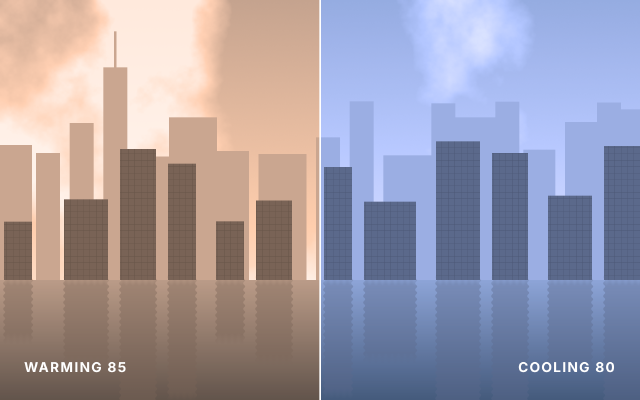
A neutral midday skyline (rendered clouds, one combined shape for the buildings with a clipped window pattern, and a blurred, flipped reflection in the river) sits under two Photo Filter adjustment layers. Each was made with half the canvas selected, so its layer mask limits it to that half: Warming (85) at 70 % density gives the left a golden-hour cast, Cooling (80) at 60 % gives the right a crisp blue morning. Both keep luminosity, so only the color temperature changes.
Steps
60 commandssteps:
- { command: gradient.fill.create, params: { from: [0, 0], to: [0, 700], stops: [[0, "#a3adb3"], [1, "#e6e4de"]] }, as: sky }
- { command: layer.renameLayer, params: { layer: $sky.layer, name: Sky } }
- { command: layer.new.layer, params: { name: Clouds }, as: clouds }
- { command: tools.setColors, params: { foreground: "#000000", background: "#ffffff" } }
- { command: filter.render.clouds, params: { seed: 31 } }
- { command: image.adjustments.levels, params: { inBlack: 130, inWhite: 245 } }
- { command: layer.setProps, params: { layer: $clouds.layer, blend: Screen, opacity: 0.8 } }
- { command: shape.create, params: { kind: rect, rect: [-20, 362, 100, 338], fill: "#a9b0b4", name: Back Skyline }, as: back }
- { command: shape.create, params: { kind: rect, rect: [90, 382, 60, 318], fill: "#a9b0b4", addTo: $back.layer, op: combine } }
- { command: shape.create, params: { kind: rect, rect: [174, 307, 60, 393], fill: "#a9b0b4", addTo: $back.layer, op: combine } }
- { command: shape.create, params: { kind: rect, rect: [258, 168, 60, 532], fill: "#a9b0b4", addTo: $back.layer, op: combine } }
- { command: shape.create, params: { kind: rect, rect: [342, 391, 80, 309], fill: "#a9b0b4", addTo: $back.layer, op: combine } }
- { command: shape.create, params: { kind: rect, rect: [422, 293, 120, 407], fill: "#a9b0b4", addTo: $back.layer, op: combine } }
- { command: shape.create, params: { kind: rect, rect: [542, 377, 80, 323], fill: "#a9b0b4", addTo: $back.layer, op: combine } }
- { command: shape.create, params: { kind: rect, rect: [646, 385, 120, 315], fill: "#a9b0b4", addTo: $back.layer, op: combine } }
- { command: shape.create, params: { kind: rect, rect: [790, 343, 60, 357], fill: "#a9b0b4", addTo: $back.layer, op: combine } }
- { command: shape.create, params: { kind: rect, rect: [874, 253, 60, 447], fill: "#a9b0b4", addTo: $back.layer, op: combine } }
- { command: shape.create, params: { kind: rect, rect: [958, 388, 120, 312], fill: "#a9b0b4", addTo: $back.layer, op: combine } }
- { command: shape.create, params: { kind: rect, rect: [1078, 258, 60, 442], fill: "#a9b0b4", addTo: $back.layer, op: combine } }
- { command: shape.create, params: { kind: rect, rect: [1138, 293, 100, 407], fill: "#a9b0b4", addTo: $back.layer, op: combine } }
- { command: shape.create, params: { kind: rect, rect: [1238, 254, 60, 446], fill: "#a9b0b4", addTo: $back.layer, op: combine } }
- { command: shape.create, params: { kind: rect, rect: [1308, 374, 80, 326], fill: "#a9b0b4", addTo: $back.layer, op: combine } }
- { command: shape.create, params: { kind: rect, rect: [1412, 305, 80, 395], fill: "#a9b0b4", addTo: $back.layer, op: combine } }
- { command: shape.create, params: { kind: rect, rect: [1492, 256, 60, 444], fill: "#a9b0b4", addTo: $back.layer, op: combine } }
- { command: shape.create, params: { kind: rect, rect: [1552, 273, 80, 427], fill: "#a9b0b4", addTo: $back.layer, op: combine } }
- { command: shape.create, params: { kind: rect, rect: [285, 78, 6, 90], fill: "#a9b0b4", addTo: $back.layer, op: combine } }
- { command: shape.create, params: { kind: rect, rect: [10, 554, 70, 146], fill: "#646a6e", name: Skyline }, as: city }
- { command: shape.create, params: { kind: rect, rect: [160, 498, 110, 202], fill: "#646a6e", addTo: $city.layer, op: combine } }
- { command: shape.create, params: { kind: rect, rect: [300, 372, 90, 328], fill: "#646a6e", addTo: $city.layer, op: combine } }
- { command: shape.create, params: { kind: rect, rect: [420, 409, 70, 291], fill: "#646a6e", addTo: $city.layer, op: combine } }
- { command: shape.create, params: { kind: rect, rect: [540, 553, 70, 147], fill: "#646a6e", addTo: $city.layer, op: combine } }
- { command: shape.create, params: { kind: rect, rect: [640, 501, 90, 199], fill: "#646a6e", addTo: $city.layer, op: combine } }
- { command: shape.create, params: { kind: rect, rect: [810, 417, 70, 283], fill: "#646a6e", addTo: $city.layer, op: combine } }
- { command: shape.create, params: { kind: rect, rect: [910, 504, 130, 196], fill: "#646a6e", addTo: $city.layer, op: combine } }
- { command: shape.create, params: { kind: rect, rect: [1090, 353, 110, 347], fill: "#646a6e", addTo: $city.layer, op: combine } }
- { command: shape.create, params: { kind: rect, rect: [1230, 382, 90, 318], fill: "#646a6e", addTo: $city.layer, op: combine } }
- { command: shape.create, params: { kind: rect, rect: [1370, 489, 110, 211], fill: "#646a6e", addTo: $city.layer, op: combine } }
- { command: shape.create, params: { kind: rect, rect: [1510, 365, 90, 335], fill: "#646a6e", addTo: $city.layer, op: combine } }
- { command: pattern.presets.apply, params: { pattern: Grid, scale: 100 }, as: windows }
- { command: layer.setProps, params: { layer: $windows.layer, name: Windows, blend: Multiply, opacity: 0.35, clipped: true } }
- { command: shape.create, params: { kind: rect, rect: [0, 700, 1600, 300], fill: { gradient: { stops: [[0, "#9aa5ab"], [1, "#4d5a62"]], angle: -90 } }, name: River }, as: river }
- { command: layer.duplicate, params: { layer: $city.layer, name: Reflection }, as: refl }
- { command: shape.rasterize, params: { layer: $refl.layer } }
- { command: edit.transform, params: { layer: $refl.layer, matrix: [1, 0, 0, -1, 0, 1400] } }
- { command: layer.moveTo, params: { layer: $refl.layer, target: $river.layer, position: above } }
- { command: layer.setProps, params: { layer: $refl.layer, opacity: 0.4 } }
- { command: filter.blur.motionBlur, params: { angle: 90, distance: 24 } }
- { command: filter.distort.ripple, params: { amount: 120, size: medium } }
- { command: select.rect, params: { x: 0, y: 0, width: 800, height: 1000 } }
- { command: layer.newAdjustmentLayer.photoFilter, params: { filter: warming85, density: 70, preserveLuminosity: true }, as: warm }
- { command: layer.renameLayer, params: { layer: $warm.layer, name: Warming 85 } }
- { command: select.rect, params: { x: 800, y: 0, width: 800, height: 1000 } }
- { command: layer.newAdjustmentLayer.photoFilter, params: { filter: cooling80, density: 60, preserveLuminosity: true }, as: cool }
- { command: layer.renameLayer, params: { layer: $cool.layer, name: Cooling 80 } }
- { command: select.deselect }
- { command: shape.create, params: { kind: rect, rect: [798, 0, 4, 1000], fill: "#ffffff", name: Divider } }
- { command: type.create, params: { x: 60, y: 930, text: "WARMING 85", font: Inter, size: 34, weight: 700, tracking: 100, color: "#ffffff", name: Warm Label } }
- { command: type.create, params: { x: 1540, y: 930, text: "COOLING 80", font: Inter, size: 34, weight: 700, tracking: 100, color: "#ffffff", align: right, name: Cool Label } }
- { command: document.sampleColor, params: { x: 400, y: 120, size: 11 }, as: warmSky }
- { command: document.sampleColor, params: { x: 1200, y: 120, size: 11 }, as: coolSky }Checks
10 checks on every buildinspect.layers= {"count":13}inspect.layers.3= {"name":"Cooling 80","kind":"Adjustment","adjustmentKind":"photoFilter","hasMask":true,"adjustmentParams":{"color":"#006dff","density":60}}inspect.layers.4= {"name":"Warming 85","kind":"Adjustment","adjustmentKind":"photoFilter","hasMask":true,"adjustmentParams":{"color":"#ec8a00","density":70}}inspect.layers.5= {"name":"Reflection","kind":"Pixel","opacity":{"approx":0.4,"tol":0.01}}inspect.layers.7= {"name":"Windows","kind":"Fill","clipped":true,"blend":"Multiply"}results.warmSky.2= {"max":0.9}results.coolSky.0= {"max":0.85}results.coolSky.2= {"min":0.95}- Diagnostics: none, the kit's own check finds nothing wrong
- The saved document opens again, and its thumbnail matches
thumb.pngwithin the render tolerance
Related
More Photo samples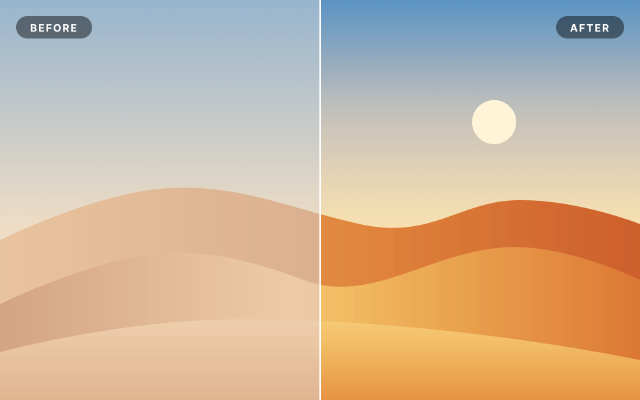
Levels & Curves Before / After
A hazy desert scene corrected with Levels, Curves and Vibrance layers masked to the right half, for a split comparison.
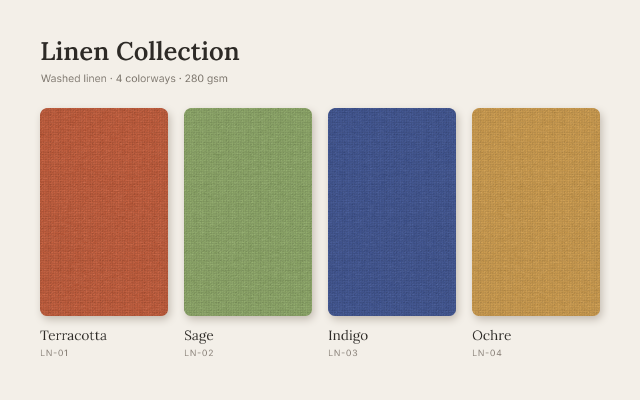
Linen Colorway Swatches
One woven texture shown in four colorways, each made by a Hue/Saturation layer masked to its own swatch.
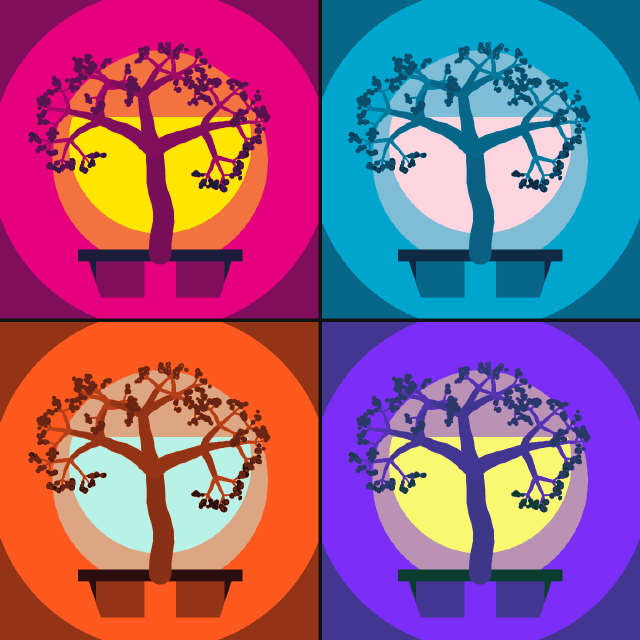
Pop Art Posterize Quad
A bonsai study repeated four times as smart objects, posterized and recolored per panel with masked Gradient Map layers.
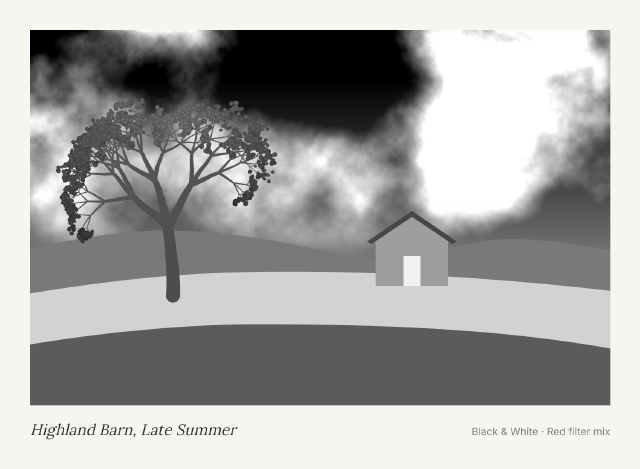
Black & White Red Filter Print
A colorful farm landscape turned into a dramatic monochrome print with a Black & White layer mixed like a red lens filter.