Volunteer Signup Form
A two-column signup page with real form controls, a field in its error state, radio cards, a consent check box and a primary button beside an illustrated panel.
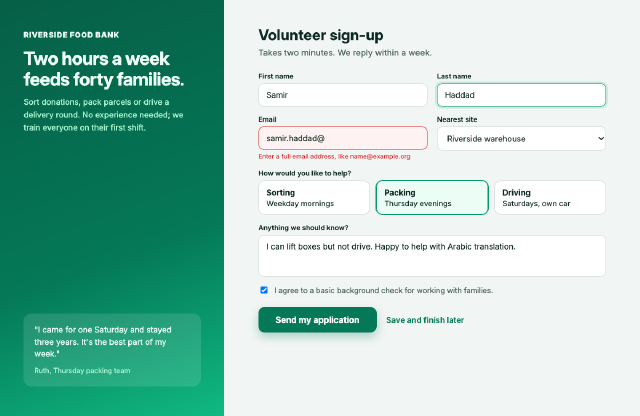
Native `<input>`, `<select>`, `<textarea>` and check boxes styled with borders, radii and focus and error states; radio choices dressed as cards with a checked style; and a side panel with a gradient and a quote. The controls are drawn by the renderer itself, values and placeholders included.
Steps
1 commandsteps:
- command: html.setSource
as: page
params:
source: |
<!doctype html>
<html lang="en">
<head>
<meta charset="utf-8">
<title>Volunteer with the Riverside Food Bank</title>
<style>
* { box-sizing: border-box; }
body { margin: 0; font-family: Inter, sans-serif; background: #f1f5f4; color: #0f2a24; display: flex; height: 780px; }
.panel { width: 420px; padding: 56px 44px; color: #ecfdf5; background: linear-gradient(160deg, #065f46, #047857 60%, #10b981); display: flex; flex-direction: column; justify-content: space-between; }
.panel h2 { font-size: 34px; line-height: 1.15; margin: 16px 0 12px; letter-spacing: -0.5px; }
.panel p { color: #a7f3d0; line-height: 1.6; font-size: 15px; margin: 0; }
.brand { font-weight: 800; letter-spacing: 1px; font-size: 14px; }
blockquote { margin: 0; padding: 20px; background: rgba(255,255,255,0.12); border-radius: 14px; font-size: 15px; line-height: 1.5; }
blockquote cite { display: block; margin-top: 10px; font-style: normal; font-size: 13px; color: #a7f3d0; }
main { flex: 1; padding: 48px 64px; }
h1 { margin: 0 0 6px; font-size: 28px; }
.sub { margin: 0 0 26px; color: #4b635c; }
.row { display: flex; gap: 18px; margin-bottom: 16px; }
.field { flex: 1; }
label { display: block; font-size: 13px; font-weight: 600; margin-bottom: 6px; }
input[type=text], input[type=email], select, textarea { width: 100%; font: inherit; font-size: 15px; padding: 11px 14px; border: 1.5px solid #cbd5d1; border-radius: 10px; background: #ffffff; color: #0f2a24; }
input.focus { border-color: #059669; box-shadow: 0 0 0 4px rgba(16,185,129,0.18); }
input.error { border-color: #dc2626; background: #fef2f2; }
.msg { color: #dc2626; font-size: 12px; margin-top: 5px; }
.choices { display: flex; gap: 12px; margin-bottom: 16px; }
.choice { flex: 1; border: 1.5px solid #cbd5d1; border-radius: 12px; padding: 12px 14px; background: #ffffff; font-size: 14px; }
.choice b { display: block; font-size: 15px; margin-bottom: 2px; }
.choice.on { border-color: #059669; background: #ecfdf5; box-shadow: 0 0 0 1px #059669; }
.consent { display: flex; gap: 10px; align-items: center; font-size: 14px; color: #4b635c; margin: 6px 0 22px; }
button { font: inherit; font-weight: 700; font-size: 16px; padding: 14px 32px; border: none; border-radius: 12px; background: #047857; color: #ffffff; box-shadow: 0 8px 18px rgba(4,120,87,0.3); }
.later { margin-left: 18px; color: #047857; font-weight: 600; font-size: 15px; }
</style>
</head>
<body>
<aside class="panel">
<div><div class="brand">RIVERSIDE FOOD BANK</div><h2>Two hours a week feeds forty families.</h2><p>Sort donations, pack parcels or drive a delivery round. No experience needed; we train everyone on their first shift.</p></div>
<blockquote>"I came for one Saturday and stayed three years. It's the best part of my week."<cite>Ruth, Thursday packing team</cite></blockquote>
</aside>
<main>
<h1>Volunteer sign-up</h1>
<p class="sub">Takes two minutes. We reply within a week.</p>
<div class="row">
<div class="field"><label>First name</label><input type="text" value="Samir"></div>
<div class="field"><label>Last name</label><input type="text" class="focus" value="Haddad"></div>
</div>
<div class="row">
<div class="field"><label>Email</label><input type="email" class="error" value="samir.haddad@"><div class="msg">Enter a full email address, like name@example.org</div></div>
<div class="field"><label>Nearest site</label><select><option>Riverside warehouse</option><option>Old Market hall</option></select></div>
</div>
<label>How would you like to help?</label>
<div class="choices">
<div class="choice"><b>Sorting</b>Weekday mornings</div>
<div class="choice on"><b>Packing</b>Thursday evenings</div>
<div class="choice"><b>Driving</b>Saturdays, own car</div>
</div>
<div class="field" style="margin-bottom:12px"><label>Anything we should know?</label><textarea rows="3">I can lift boxes but not drive. Happy to help with Arabic translation.</textarea></div>
<div class="consent"><input type="checkbox" checked> I agree to a basic background check for working with families.</div>
<button>Send my application</button><span class="later">Save and finish later</span>
</main>
</body>
</html>Checks
6 checks on every buildinspect.width= 1200inspect.height= 780inspect.source= {"contains":"class=\"error\""}results.page.changed= true- Diagnostics: none, the kit's own check finds nothing wrong
- The saved document opens again, and its thumbnail matches
thumb.pngwithin the render tolerance
Related
More HTML samples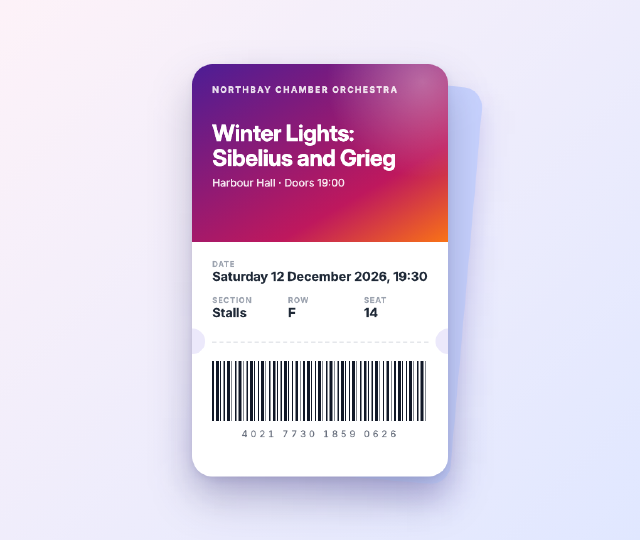
Concert Ticket Card
A mobile e-ticket for an orchestra concert, with a gradient header, punched notches, a dashed tear line, seat details in a grid and a barcode drawn with a repeating gradient.
Help Centre Tabs Accordion
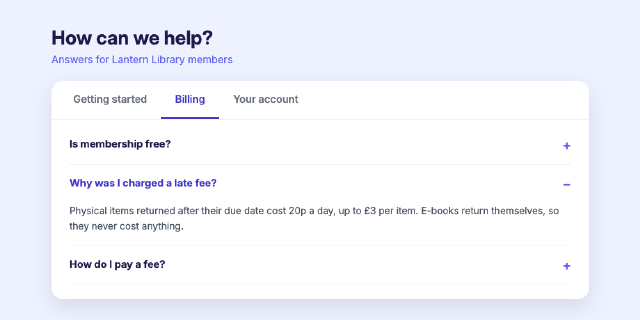
A help-centre panel with tabs and an accordion driven by a small script; two clicks switch to the Billing tab and open its second question before the thumbnail is taken.
Home Energy Dashboard
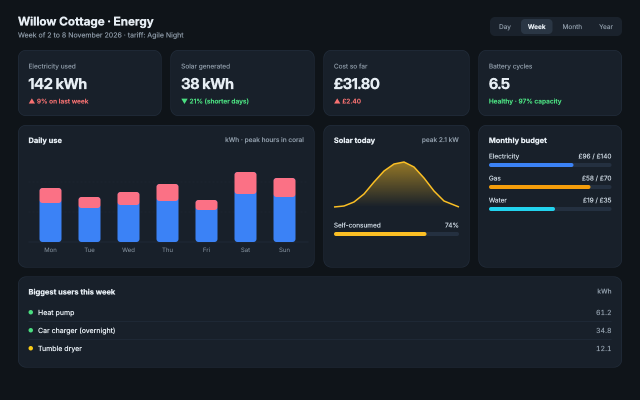
A household energy dashboard with KPI cards, an inline SVG bar chart of daily use, a solar sparkline, progress bars and a device list, laid out with CSS grid.
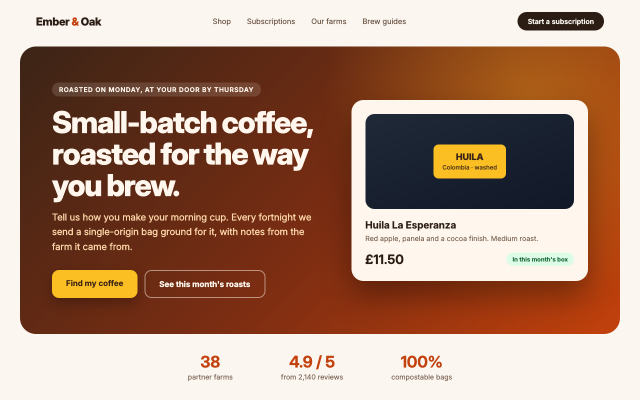
Coffee Roaster Landing Hero
The first screen of a coffee subscription site, with a navigation bar, a gradient hero, two call-to-action buttons, a product card and a row of trust figures.