Prepare the brief
Describe the character, clothing, pose, setting, and the visual traits that should remain consistent.
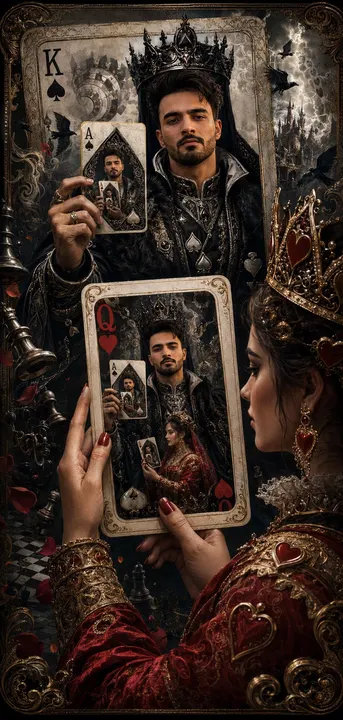
Recursive king of spades card. Transform your reference image using this visual style and composition.
This is an editing template. Attach a reference image before running it.
Template inputs
- Changes and details (optional)
- What should change or stay the same?
Suggested settings
| Operation | edit |
|---|---|
| Aspect ratio | 9:16 |
| Quality | high |
| Resolution | 2K |
| Text | Generated text is part of the image; proofread it. |
| Available surfaces | document, table, whiteboard |
Use this template in Kition
- Open the image template picker from a supported document, table, or Whiteboard image surface.
- Search for “Recursive king of spades card” and compare the preview with this example. The catalog ID is
gpt-image-2-case-502, version 1.0.0. - Attach the reference image and describe the changes to make.
- Choose an image-capable service, check the available dimensions and usage cost, then generate one candidate.
- Review the result, save the useful image into the workspace, and retain the brief with the output.
Review the output
Inspect hands, facial features, clothing continuity, and pose. Keep a checked reference alongside the final candidate for subsequent work.
Use a table record to track the brief, candidate image, owner, and review status. Insert the selected asset into a document for context, or use Design Studio when the headline needs to remain editable.
Source and limitations
Preview examples and adapted templates originate from the credited MIT-licensed library. They illustrate a visual direction and do not promise identical output. Kition requires a configured image service; model requests may consume provider usage or Cloud credits.
Read the full source licenseA generated image is a raster asset. Rendering a table, document, or interface inside the image does not create a working table, document, or app.