Music Ducking Under Dialogue
A music bed that dips 15 dB whenever an interview answer plays, written by Essential Sound auto-ducking, with a diagram of the mix.
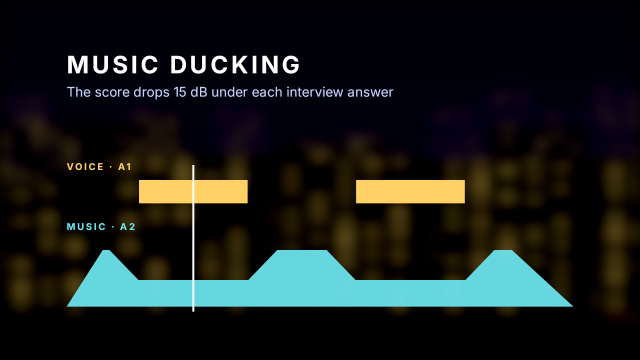
Two short clips on A1 stand in for interview answers (2–5 s and 8–11 s) and are tagged Dialogue with essentialSound.setType. audio.bed then lays the Ambient Score under the whole picture on A2 at −9.4 dB with fades at both ends, marks it as Music and generates ducking against dialogue: eight Volume keyframes that pull the music down 15 dB around each answer. The picture is a diagram of exactly that mix over the blurred city, with a moving playhead.
Animated sample: watch the preview (WebP animation).
Steps
28 commands · after thedemo-footage preludesteps:
- { command: file.newSequence, params: { name: Interview Mix, width: 1920, height: 1080, fps: 24, video: 3, audio: 2 } }
- { command: timeline.place, params: { item: 7, track: V1, seconds: 0, audio: false }, as: city }
- { command: effects.apply, params: { clips: [$city.clips.0], effect: gaussian_blur } }
- { command: effects.setParam, params: { clip: $city.clips.0, effect: gaussian_blur, param: blurriness, value: 40 } }
- { command: effects.apply, params: { clips: [$city.clips.0], effect: brightness_contrast } }
- { command: effects.setParam, params: { clip: $city.clips.0, effect: brightness_contrast, param: brightness, value: -30 } }
- { command: timeline.place, params: { item: 9, track: A1, seconds: 2, duration: 762048000000, video: false }, as: answer1 }
- { command: timeline.place, params: { item: 9, track: A1, seconds: 8, duration: 762048000000, video: false }, as: answer2 }
- { command: essentialSound.setType, params: { clips: [$answer1.clips.0, $answer2.clips.0], type: dialogue }, as: tagged }
- { command: audio.bed, params: { item: 11, duck: { against: dialogue, reduceDb: -15 } }, as: bed }
# The diagram: time runs from x 200 (0 s) to x 1720 (14 s); the music line is a path in frame pixels.
- { command: graphics.newText, params: { text: MUSIC DUCKING, position: [200, 220], size: 72, seconds: 14, track: 1, time: 0 }, as: diagram }
- { command: graphics.set, params: { clip: $diagram.clip, props: { font_style: Bold, tracking: 120, fill_color: "#ffffff" } } }
- { command: graphics.newText, params: { clip: $diagram.clip, text: The score drops 15 dB under each interview answer, position: [200, 290], size: 40 } }
- { command: graphics.set, params: { clip: $diagram.clip, props: { fill_color: "#c9d3ff" } } }
- { command: graphics.newText, params: { clip: $diagram.clip, text: VOICE · A1, position: [200, 510], size: 28 } }
- { command: graphics.set, params: { clip: $diagram.clip, props: { font_style: Bold, tracking: 200, fill_color: "#ffd166" } } }
- { command: graphics.newRectangle, params: { clip: $diagram.clip, position: [580, 575], size: [325.7, 70] } }
- { command: graphics.set, params: { clip: $diagram.clip, props: { fill_color: "#ffd166" } } }
- { command: graphics.newRectangle, params: { clip: $diagram.clip, position: [1231.4, 575], size: [325.7, 70] } }
- { command: graphics.set, params: { clip: $diagram.clip, props: { fill_color: "#ffd166" } } }
- { command: graphics.newText, params: { clip: $diagram.clip, text: MUSIC · A2, position: [200, 690], size: 28 } }
- { command: graphics.set, params: { clip: $diagram.clip, props: { font_style: Bold, tracking: 200, fill_color: "#6ee7f0" } } }
- { command: graphics.newShape, params: { clip: $diagram.clip, shape: path, points: [[200, 920], [308.6, 750], [328.1, 750], [415, 840], [745, 840], [831.9, 750], [979.5, 750], [1066.4, 840], [1396.5, 840], [1483.3, 750], [1535.4, 750], [1720, 920]] } }
- { command: graphics.set, params: { clip: $diagram.clip, props: { fill_color: "#6ee7f0", opacity: 85 } } }
- { command: graphics.newRectangle, params: { position: [960, 540], size: [6, 440], seconds: 14, track: 2, time: 0 }, as: playhead }
- { command: graphics.set, params: { clip: $playhead.clip, props: { fill_color: "#ffffff" } } }
- { command: effects.setParam, params: { clip: $playhead.clip, effect: motion, param: position, value: [200, 715], seconds: 0 } }
- { command: effects.setParam, params: { clip: $playhead.clip, effect: motion, param: position, value: [1720, 715], seconds: 14 } }Checks
11 checks on every buildresults.tagged= {"clips":2,"type":"Dialogue"}results.bed.audioTrack= "A2"results.bed.gainDb= -9.4results.bed.ducking.0.regions= {"count":2}inspect.sequence.audio.0.items= {"count":2}inspect.sequence.audio.1.items.0= {"name":"Ambient_Score.wav","gainDb":-9.4}inspect.sequence.audio.1.items.0.effects.0.effect= "volume"inspect.sequence.audio.1.items.0.effects.0.params.level.keyframes= [{"time":{"min":254016000000,"max":508032000000},"value":0},{"time":{"min":254016000000,"max":508032000000},"value":-15},{"time":{"min":1270080000000,"max":1…inspect.sequence.audio.1.transitions= {"count":2,"all":{"effect":"constant_gain"}}- Diagnostics: none, the kit's own check finds nothing wrong
- The saved document opens again, and its thumbnail matches
thumb.pngwithin the render tolerance
Related
More Film samples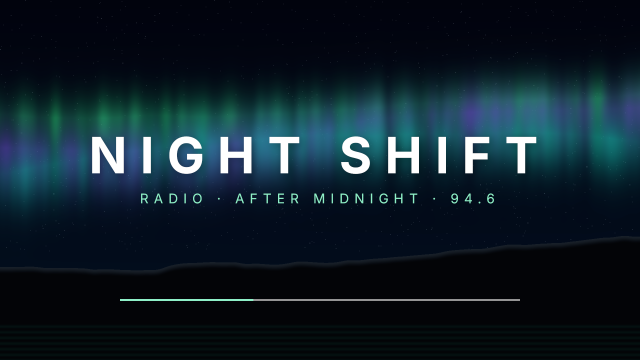
Radio Theme Volume Fades
A late-night radio show's theme rises in over two seconds and sinks out over three, drawn with eased Volume keyframes on the music clip.
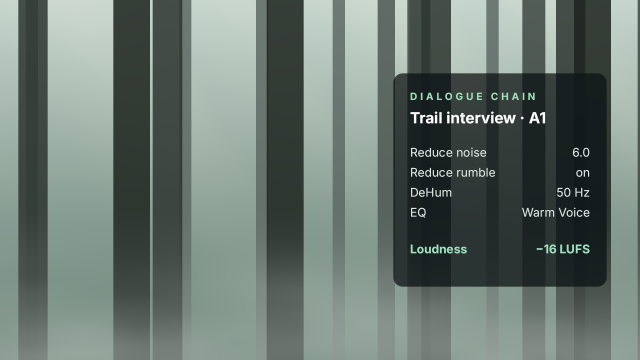
Field Interview Voice Cleanup
An outdoor interview's sound tagged as Dialogue and cleaned with Essential Sound repair, clarity EQ and a −16 LUFS loudness match.
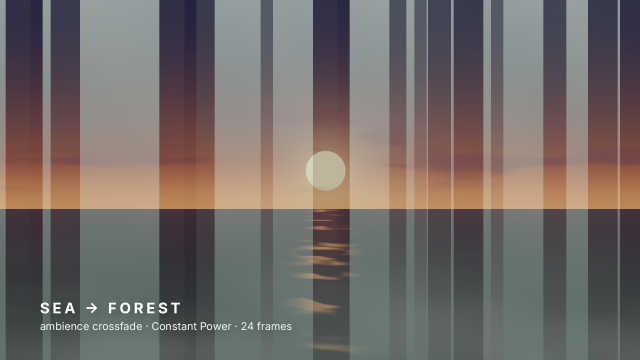
Constant Power Ambience Crossfade
Sea ambience hands over to forest ambience with a one-second Constant Power crossfade, under a matching cross dissolve.
Bars and Tone Line-Up
A delivery master's head build of colour bars with a 1 kHz reference tone at −20 dBFS, an ident box and a counting leader.