Solar Output Bar Chart
Four quarterly bars grow from the baseline with a small overshoot while their numbers count up to the final values.
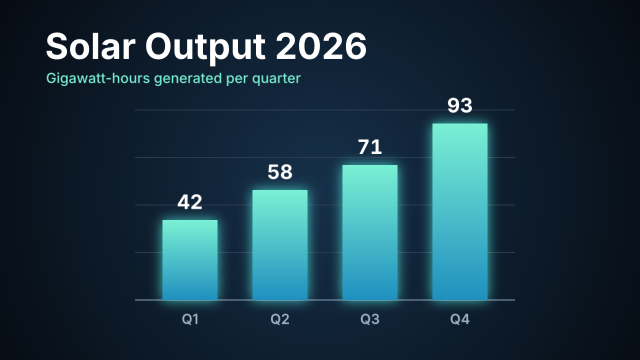
An animated chart for an energy report. Each bar is a shape layer whose Anchor Point sits on the baseline, so a Scale keyframe pair (Y 0 to 100 %, eased with `settle`) grows it upward and lets it land a touch past its height. The numbers use the Count Up text preset, timed to the bars (with a short Opacity fade), and the gridlines are five rectangles in one shape layer.
Animated sample: watch the preview (WebP animation).
Steps
61 commandssteps:
- { command: comp.settings, params: { name: Solar Output Chart, duration: 6, frameRate: 30 } }
- { command: layer.newSolid, params: { name: Backdrop, color: "#0b1622" }, as: bg }
- { command: effect.apply, params: { layers: [$bg.layer], effect: Gradient Ramp, params: { shape: 1, start: [640, 380], end: [640, 1150], startColor: "#16304a", endColor: "#050a10" } } }
- { command: shape.newShape, params: { kind: rect, size: [760, 3], position: [650, 600], fill: "#5d7389", name: Gridlines }, as: grid }
- { command: shape.newShape, params: { layer: $grid.layer, kind: rect, size: [760, 2], position: [650, 505], fill: "#2a3a4f" } }
- { command: shape.newShape, params: { layer: $grid.layer, kind: rect, size: [760, 2], position: [650, 410], fill: "#2a3a4f" } }
- { command: shape.newShape, params: { layer: $grid.layer, kind: rect, size: [760, 2], position: [650, 315], fill: "#2a3a4f" } }
- { command: shape.newShape, params: { layer: $grid.layer, kind: rect, size: [760, 2], position: [650, 220], fill: "#2a3a4f" } }
- { command: layer.newText, params: { text: Solar Output 2026, position: [90, 118], size: 72, font: Inter, style: Bold, fill: "#ffffff", justify: left }, as: title }
- { command: layer.applyTextPreset, params: { layer: $title.layer, preset: blurSlide, start: 0 } }
- { command: layer.newText, params: { text: Gigawatt-hours generated per quarter, position: [92, 166], size: 28, font: Inter, style: Medium, fill: "#7af0d4", justify: left }, as: sub }
- { command: layer.applyTextPreset, params: { layer: $sub.layer, preset: blurSlide, variant: subtitle, start: 0.3 } }
- { command: layer.newShape, params: { kind: rect, name: Bar Q1, size: [110, 160], fillGradient: ["#7af0d4", "#1f8fbf"], fillAngle: 90, position: [380, 520] }, as: bar0 }
- { command: prop.set, params: { layer: $bar0.layer, path: transform/anchor, value: [0, 80, 0] } }
- { command: prop.set, params: { layer: $bar0.layer, path: transform/position, value: [380, 600, 0] } }
- { command: prop.addKey, params: { layer: $bar0.layer, path: transform/scale, time: 0.6, value: [100, 0, 100] } }
- { command: prop.addKey, params: { layer: $bar0.layer, path: transform/scale, time: 1.5, value: [100, 100, 100] } }
- { command: keys.applyEase, params: { layer: $bar0.layer, path: transform/scale, preset: settle, from: 0.6, to: 1.5 } }
- { command: layer.newText, params: { text: "42", name: Value Q1, position: [380, 418], size: 40, font: Inter, style: Bold, fill: "#ffffff", justify: center }, as: val0 }
- { command: layer.applyTextPreset, params: { layer: $val0.layer, preset: countUp, from: 0, to: 42, start: 0.6, duration: 0.9 }, as: count0 }
- { command: prop.addKey, params: { layer: $val0.layer, path: transform/opacity, time: 0.6, value: 0 } }
- { command: prop.addKey, params: { layer: $val0.layer, path: transform/opacity, time: 0.9, value: 100 } }
- { command: layer.newText, params: { text: Q1, name: Label Q1, position: [380, 648], size: 28, font: Inter, style: SemiBold, fill: "#9fb3c8", justify: center }, as: lab0 }
- { command: layer.applyTextPreset, params: { layer: $lab0.layer, preset: fadeUpCharacters } }
- { command: layer.newShape, params: { kind: rect, name: Bar Q2, size: [110, 220], fillGradient: ["#7af0d4", "#1f8fbf"], fillAngle: 90, position: [560, 490] }, as: bar1 }
- { command: prop.set, params: { layer: $bar1.layer, path: transform/anchor, value: [0, 110, 0] } }
- { command: prop.set, params: { layer: $bar1.layer, path: transform/position, value: [560, 600, 0] } }
- { command: prop.addKey, params: { layer: $bar1.layer, path: transform/scale, time: 0.9, value: [100, 0, 100] } }
- { command: prop.addKey, params: { layer: $bar1.layer, path: transform/scale, time: 1.8, value: [100, 100, 100] } }
- { command: keys.applyEase, params: { layer: $bar1.layer, path: transform/scale, preset: settle, from: 0.9, to: 1.8 } }
- { command: layer.newText, params: { text: "58", name: Value Q2, position: [560, 358], size: 40, font: Inter, style: Bold, fill: "#ffffff", justify: center }, as: val1 }
- { command: layer.applyTextPreset, params: { layer: $val1.layer, preset: countUp, from: 0, to: 58, start: 0.9, duration: 0.9 }, as: count1 }
- { command: prop.addKey, params: { layer: $val1.layer, path: transform/opacity, time: 0.9, value: 0 } }
- { command: prop.addKey, params: { layer: $val1.layer, path: transform/opacity, time: 1.2, value: 100 } }
- { command: layer.newText, params: { text: Q2, name: Label Q2, position: [560, 648], size: 28, font: Inter, style: SemiBold, fill: "#9fb3c8", justify: center }, as: lab1 }
- { command: layer.applyTextPreset, params: { layer: $lab1.layer, preset: fadeUpCharacters } }
- { command: layer.newShape, params: { kind: rect, name: Bar Q3, size: [110, 270], fillGradient: ["#7af0d4", "#1f8fbf"], fillAngle: 90, position: [740, 465] }, as: bar2 }
- { command: prop.set, params: { layer: $bar2.layer, path: transform/anchor, value: [0, 135, 0] } }
- { command: prop.set, params: { layer: $bar2.layer, path: transform/position, value: [740, 600, 0] } }
- { command: prop.addKey, params: { layer: $bar2.layer, path: transform/scale, time: 1.2, value: [100, 0, 100] } }
- { command: prop.addKey, params: { layer: $bar2.layer, path: transform/scale, time: 2.1, value: [100, 100, 100] } }
- { command: keys.applyEase, params: { layer: $bar2.layer, path: transform/scale, preset: settle, from: 1.2, to: 2.1 } }
- { command: layer.newText, params: { text: "71", name: Value Q3, position: [740, 308], size: 40, font: Inter, style: Bold, fill: "#ffffff", justify: center }, as: val2 }
- { command: layer.applyTextPreset, params: { layer: $val2.layer, preset: countUp, from: 0, to: 71, start: 1.2, duration: 0.9 }, as: count2 }
- { command: prop.addKey, params: { layer: $val2.layer, path: transform/opacity, time: 1.2, value: 0 } }
- { command: prop.addKey, params: { layer: $val2.layer, path: transform/opacity, time: 1.5, value: 100 } }
- { command: layer.newText, params: { text: Q3, name: Label Q3, position: [740, 648], size: 28, font: Inter, style: SemiBold, fill: "#9fb3c8", justify: center }, as: lab2 }
- { command: layer.applyTextPreset, params: { layer: $lab2.layer, preset: fadeUpCharacters } }
- { command: layer.newShape, params: { kind: rect, name: Bar Q4, size: [110, 353], fillGradient: ["#7af0d4", "#1f8fbf"], fillAngle: 90, position: [920, 423.5] }, as: bar3 }
- { command: prop.set, params: { layer: $bar3.layer, path: transform/anchor, value: [0, 176.5, 0] } }
- { command: prop.set, params: { layer: $bar3.layer, path: transform/position, value: [920, 600, 0] } }
- { command: prop.addKey, params: { layer: $bar3.layer, path: transform/scale, time: 1.5, value: [100, 0, 100] } }
- { command: prop.addKey, params: { layer: $bar3.layer, path: transform/scale, time: 2.4, value: [100, 100, 100] } }
- { command: keys.applyEase, params: { layer: $bar3.layer, path: transform/scale, preset: settle, from: 1.5, to: 2.4 } }
- { command: layer.newText, params: { text: "93", name: Value Q4, position: [920, 225], size: 40, font: Inter, style: Bold, fill: "#ffffff", justify: center }, as: val3 }
- { command: layer.applyTextPreset, params: { layer: $val3.layer, preset: countUp, from: 0, to: 93, start: 1.5, duration: 0.9 }, as: count3 }
- { command: prop.addKey, params: { layer: $val3.layer, path: transform/opacity, time: 1.5, value: 0 } }
- { command: prop.addKey, params: { layer: $val3.layer, path: transform/opacity, time: 1.8, value: 100 } }
- { command: layer.newText, params: { text: Q4, name: Label Q4, position: [920, 648], size: 28, font: Inter, style: SemiBold, fill: "#9fb3c8", justify: center }, as: lab3 }
- { command: layer.applyTextPreset, params: { layer: $lab3.layer, preset: fadeUpCharacters } }
- { command: layer.style.add, params: { layers: [$bar0.layer, $bar1.layer, $bar2.layer, $bar3.layer], style: outerGlow, params: { color: "#3fd6c8", opacity: 45, size: 24 } } }Checks
5 checks on every buildinspect.comp= {"name":"Solar Output Chart","duration":6}inspect.info.layers= {"count":16,"any":{"name":"Bar Q4","type":"Shape","animated":[{"name":"Scale","times":[1.5,2.4]}]}}results.count3= {"preset":"countUp"}- Diagnostics: none, the kit's own check finds nothing wrong
- The saved document opens again, and its thumbnail matches
thumb.pngwithin the render tolerance
Related
More Motion samples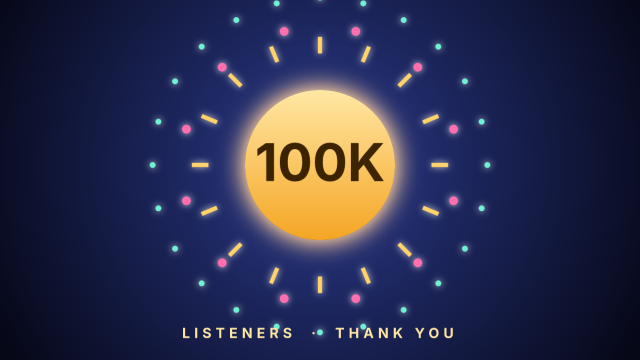
Milestone Confetti Burst
A gold badge pops in for a 100K-listener milestone while rays and two rings of dots burst outward around it.
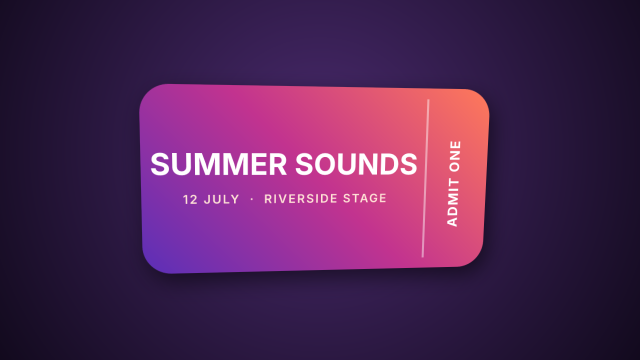
Festival Ticket Card Flip
A 3D festival ticket swings round into view in front of a camera and settles at a slight angle.
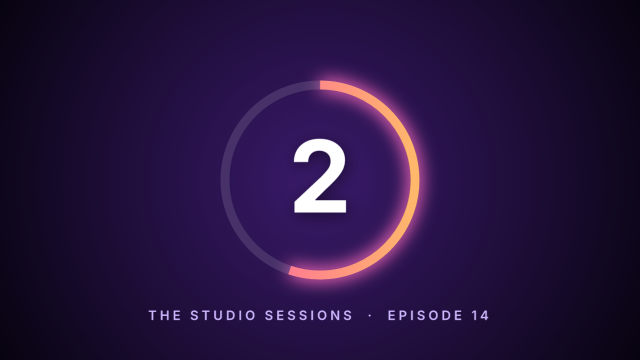
Livestream Countdown Ring
A three-second countdown for a live stream, each number punching in while a glowing ring drains around it.
Reef Interview Lower Third
A name plate slides in over a soft bokeh backdrop, then the name and role rise into place word by word.